A more elegant GPO Export Script

My previous post Export All GPOs in a domain to XML or HTML gets hit quite frequently, and today I had need to use the script so I took a bit more time to refine it.

Now instead of having to run two separate scripts, it has been consolidated to one, and the following features have been added:

  1. Pop up explorer to select export location
  2. exports a csv list of all of the GPOs
  3. sanitizes GPO names that contain forward or back slashes and replaces these characters with hyphens
  4. puts a subfolder for HTML and a subfolder for XML in the export location specified
  5. Utilizes transcript to a text log in the export location
  6. zips both folders, log, and csv into an archive for easy upload/download
  7. has a confirmation button that the script completed with the export location on script completion.

In the end, the selected export folder will contain the following:

  1. A folder called “HTML” with an individual HTML export of each group policy in the domain
  2. A folder called “XML” with an individual XML export of each group policy in the domain
  3. A text file that includes the transcript of the powershell session
  4. A csv that includes a list of all the GPOs found
  5. A zip file of all of the above

##prompt user to select a folder for exports
$Shell = New-Object -ComObject "WScript.Shell"
$Button = $Shell.Popup("Please select a folder to store exported reports.", 0, "Completed", 0)
Add-Type -AssemblyName System.Windows.Forms
$browser = New-Object System.Windows.Forms.FolderBrowserDialog
$null = $browser.ShowDialog()
$rootpath = $browser.SelectedPath

##define export paths for all outputs
$gpolist = Join-Path -path $rootpath -ChildPath "GPO-list.csv"
$logfile = Join-Path -path $rootpath -ChildPath "GPO-Export-Log.txt"
$HTMLfolderpath = join-path $rootpath HTML
$XMLfolderpath = join-path $rootpath XML

##start logging
Start-transcript -path $logfile

##check for folders, create if they don't exist
if(!(Test-path -PathType Container $htmlfolderpath))
{
    write-host "creating HTML Export Directory" -ForegroundColor DarkGreen -BackgroundColor Black
    start-sleep -seconds 2
    New-item -ItemType Directory -path $HTMLfolderpath
}

if(!(Test-path -PathType Container $XMLfolderpath))
{
    write-host "creating XML Export Directory" -ForegroundColor DarkGreen -BackgroundColor Black
    start-sleep -seconds 2
    New-item -ItemType Directory -path $XMLfolderpath
}

#get list of GPOS and exports as CSV
write-host "Getting List of GPOs"
start-sleep -seconds 2
$AllGpos = get-gpo -all
$AllGpos | Export-Csv $gpolist

##iterate through GPOS to export reports
ForEach($g in $AllGpos)
{
    $filename = $g.DisplayName
    ##replaces backslashes and forward slashes with hyphens
    $filename = $filename -replace '\\', '-'
    $filename = $filename -replace '/', '-'
    write-host "exporting reports for GPO $filename" -ForegroundColor DarkGreen -BackgroundColor Black
    $HTMLfullpath = join-path -path $HTMLfolderpath -childpath $filename
    $HTMLGpo = Get-GPOReport -reporttype html -guid $g.Id -path $HTMLfullpath
    $XMLfullpath = join-path -path $XMLfolderpath -childpath  $filename
    $XMLGpo = Get-GPOReport -reporttype xml -guid $g.Id -path $XMLfullpath

}

##add HTML extensions to exported HTML files
Write-host "adding extension to HTML files" -ForegroundColor DarkGreen -BackgroundColor Black
get-childitem -path $HTMLfolderpath | Rename-Item -NewName { $PSItem.Name + ".html" }

##add XML extensions to exported XML files
Write-host "adding extension to XML files" -ForegroundColor DarkGreen -BackgroundColor Black
get-childitem -path $XMLfolderpath | Rename-Item -NewName { $PSItem.Name + ".xml" }

##stop logging
Stop-transcript

##zip all results into export folder
Write-host "zipping results" -ForegroundColor DarkGreen -BackgroundColor Black
$zipfile = $rootpath + "\allGPOs.zip"
compress-archive -path $rootpath -DestinationPath $zipfile

##prompt user that export is completed
Write-host "Completed Export" -ForegroundColor DarkGreen -BackgroundColor Black
$Shell = New-Object -ComObject "WScript.Shell"
$Button = $Shell.Popup("Export Completed to $rootpath. Click OK to Exit.", 0, "Completed", 0)


MS Teams – White Video

Haven’t seen much of anything from Microsoft on this, but having experienced it myself this week and having a number of co-workers and clients running into this this week, it is certainly worth sharing the fix I have found to be reliable.

Issue: Inbound video in meetings is white screens only

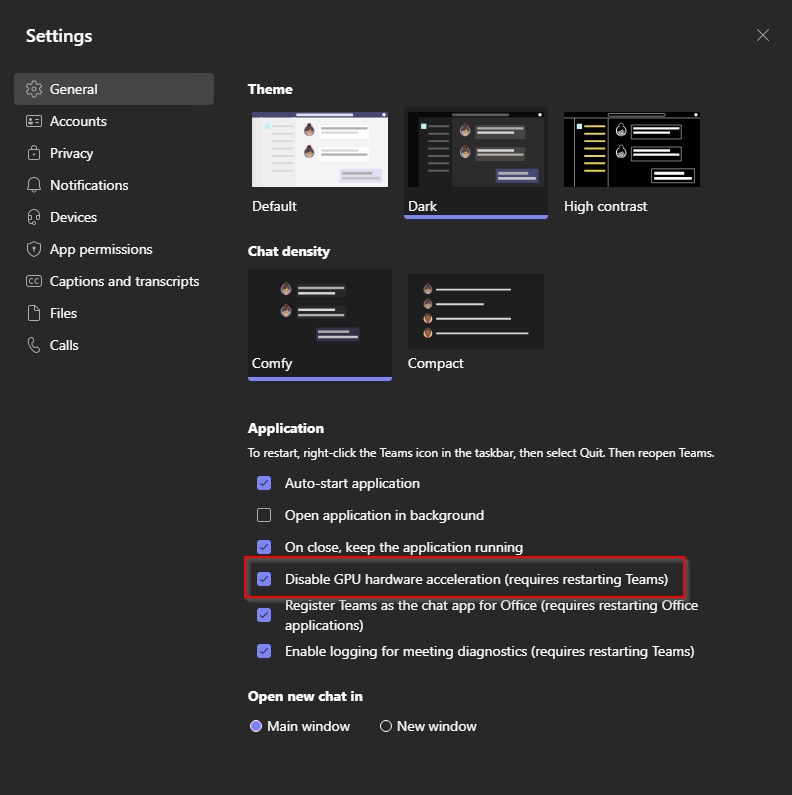
Fix: access your teams settings and uncheck the box for “Disable GPU hardware acceleration (requires restarting Teams)”

That should be it! Restart Teams and your video woes should be good to go.

If you are an administrator, I have not yet found a way to deploy this administratively, but if you do, please share!

Wonky audio devices – the case of randomness

Short and sweet one today, but I have run into this a few times and it tends to evade me for far longer than it should each time. This time it happened to me.

Occasionally a headset, be it bluetooth or wired, will work seemingly flawlessly for a few hours, but at some point will stop working on one or more applications. In my case, a brand new bluetooth headset worked in Teams in the morning, but by the afternoon, I couldn’t hear anything. Windows sounds still played fine, and my music streaming was loud and clear, but Teams just wasn’t giving me anything!

After replacing, rebooting, resetting, reconnecting, and fighting with it over a few days, I finally found the setting that was buried in the back of my head that I couldn’t find for the life of me. Steps below:

  1. Open the original control panel
  2. Select to view by “small icons”
  3. Open the “sound” option
  4. Locate your headset in the list of playback options and select it
  5. Click “properties”
  6. Go to the advanced tab
  7. Uncheck “Allow applications to take exclusive control of this device”
  8. if issues persist, repeat and uncheck “enable audio enhancements”

That’s it. Other than reinstall, reconnecting, rebooting, resetting. That’s the trick that has worked for me in this situation. Good luck out there!

Export All GPOs in a domain to XML or HTML

EDIT 8/28/2024: I have updated this script and it is available at A more elegant GPO Export Script

Not a lot of exposition on this one.

I have a client that has 100+ Group Policy Objects that I wanted to export. Now in the time I was developing a way to automatically do this, I probably could have right clicked each and exported, but that’s no fun and I can use this script in the future.

General Script Notes

  1. Change $folderpath variable to an existing folder path, this script will not create the folder structure, but if you want to add that, feel free
  2. the last line will go through this entire folder and rename with a new file extension, xml or html, depending on which script you are running. Please use a clean and empty folder for this. If there is anything else in the folder, it will get the filetype changed!

Powershell script to export all GPOs to XML

$folderpath = "C:\path\to\existing\folder\"
$AllGpos = get-gpo -all
ForEach($g in $AllGpos)
{
    $filename = $g.DisplayName
    $fullpath = join-path -path $folderpath -ChildPath $filename
    $Gpo = Get-GPOReport -reporttype xml -guid $g.Id -path $fullpath

}

get-childitem -path $folderpath | Rename-Item -NewName { $PSItem.Name + ".xml" }

Powershell script to export all GPOs to HTML

$folderpath = "C:\path\to\existing\folder\"
$AllGpos = get-gpo -all
ForEach($g in $AllGpos)
{
    $filename = $g.DisplayName
    $fullpath = join-path -path $folderpath -ChildPath $filename
    $Gpo = Get-GPOReport -reporttype html -guid $g.Id -path $fullpath

}

get-childitem -path $folderpath | Rename-Item -NewName { $PSItem.Name + ".html" }

That’s all for today!

Logins, logins, logins: How to use profiles in browsers

Photo by Andrea Piacquadio on Pexels.com

Why use profiles?

If you work in tech, specifically in a consulting or service provider role, you may find yourself logging in and out of websites to jump between Microsoft 365 tenants, domain registrar accounts, email accounts, and various other websites. Even if you are not working in tech, you may have multiple logins for the same site for different things, or multiple email accounts that have to be logged in and out of. For example, if you have a personal outlook.com account and a work or school account that uses Microsoft 365, you may find yourself trying to access email and finding you are in the wrong account.

Additionally, since web browsers are consistently getting “smarter” and storing credentials and cookies, if a browser is not fully closed or cleared, you may think you have logged into a different account but may still end up logged into an account that was previously logged in, causing review of inaccurate information, or even worse, changes to be made in the wrong account.

The below sections will show you how to create profiles in Google Chrome and Microsoft Edge, two of the most commonly used web browsers. The advantage to having separate profiles is that the cached credentials and cookies are separated between these profiles, so if you create a profile for “ABC Widgets” and use it to sign into the Microsoft 365 account for ABC Widgets, when you return to your own profile or the profile for “XYZ Financial”, it behaves as if you have never signed in to “ABC Widgets”.

Additionally, when using profiles, you can use the “keep me signed in” functionality of Microsoft 365 and other vendors. This allows you to open the profile in the browser and be already signed into the account for the site you are browsing to. Each profile can also have it’s own separate bookmarks, search history, saved passwords, and other settings.

Finally, you can also create a separate work and home profile in the same browser. If you are using a home computer for work purposes, this can help to keep the logins and activity separate from each other.

Setting up profiles in Google Chrome

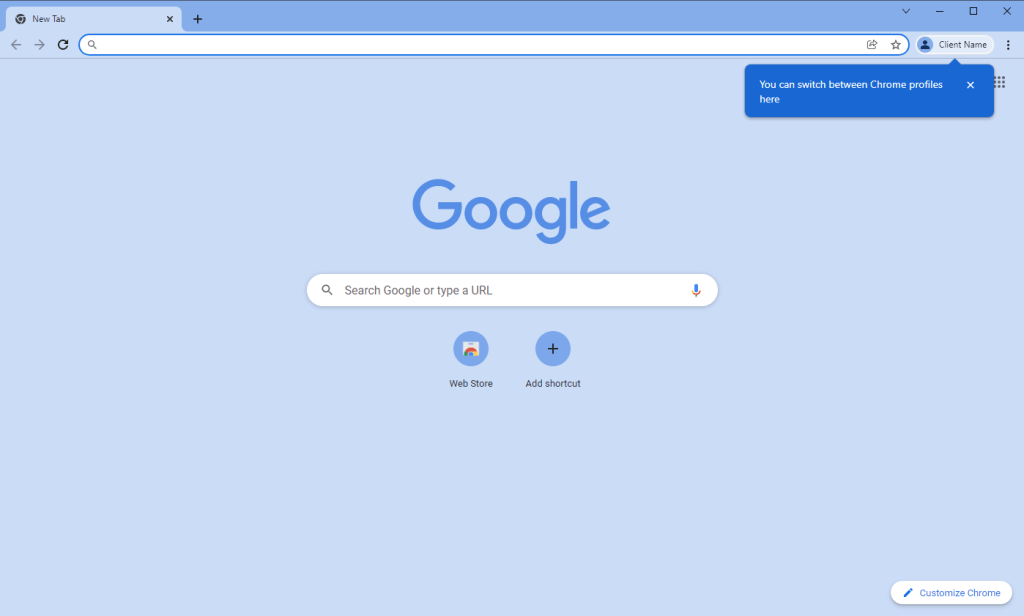
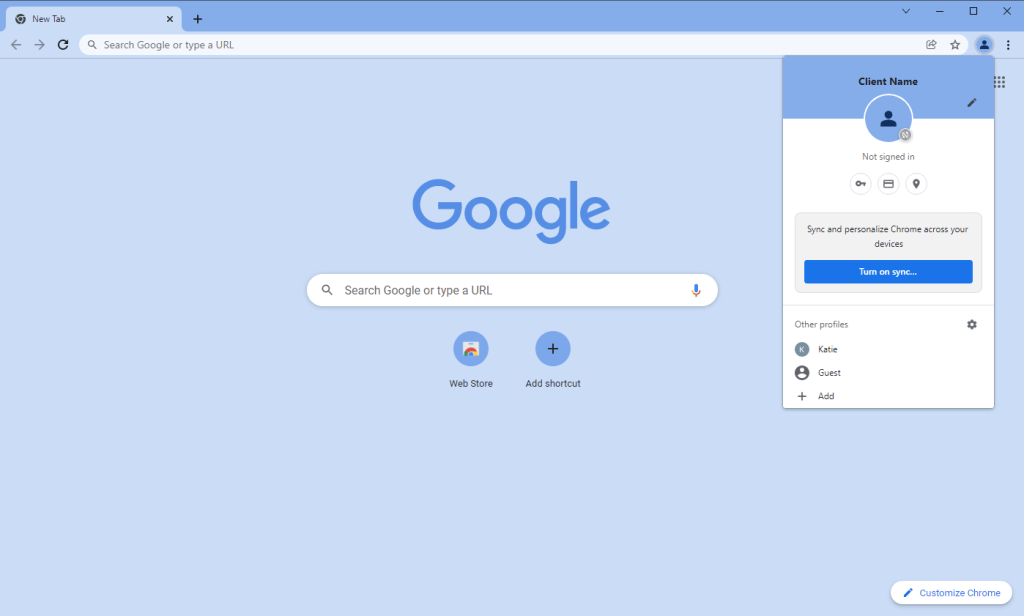
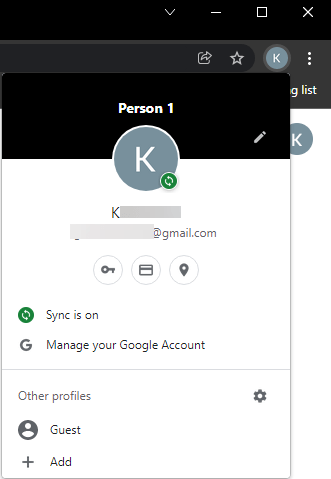
If you are signed into Chrome, there will be an icon with your image or initial in the top right. Click it to open a dropdown menu.

From the dropdown, click on the option for “add”

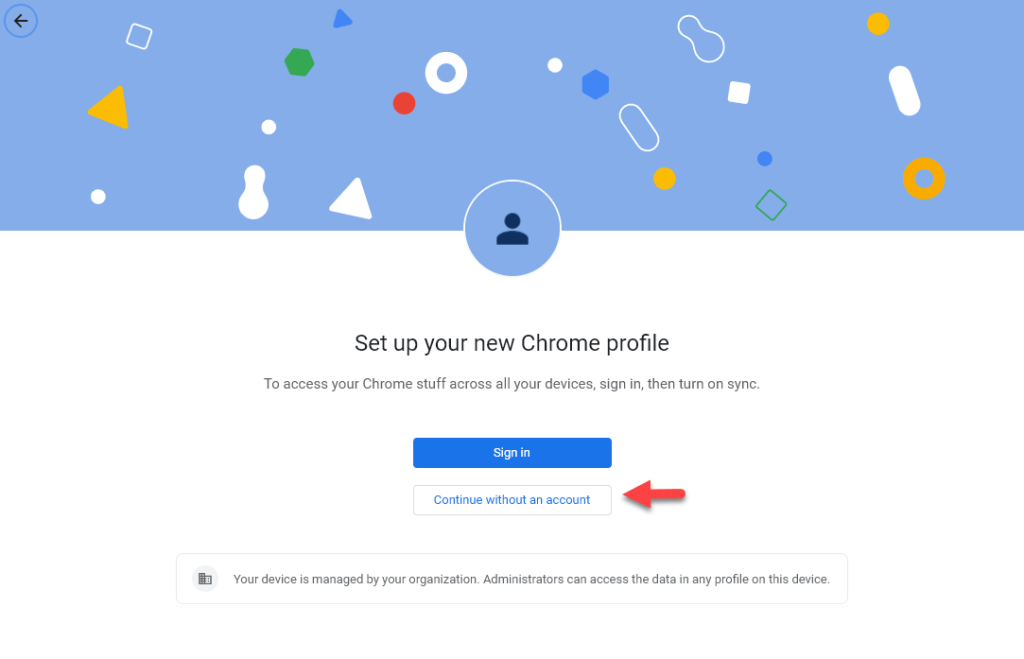
In the window that opens, select “Continue without an account”

(you may choose to sign in if you are creating a secondary google profile, perhaps if you have gmail at home and google apps for work.)

Give the profile a name, Set the desired theme color for the profile, and select if you want a desktop shortcut automatically created**

Tip: I use a dark grey or black theme for my own profile, and colors for any of my client profiles. This is a quick visual indicator of whether I’m in my personal profile or a client’s.

The new profile will open in it’s own new window automatically after you click done on the previous step.

Click in the same spot to view profiles, or open a new window in a different profile

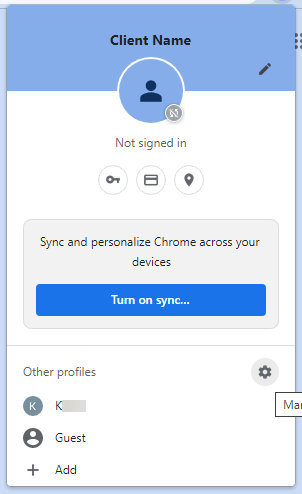
If you click on the settings gear in the dropdown menu, you can manage your profiles.

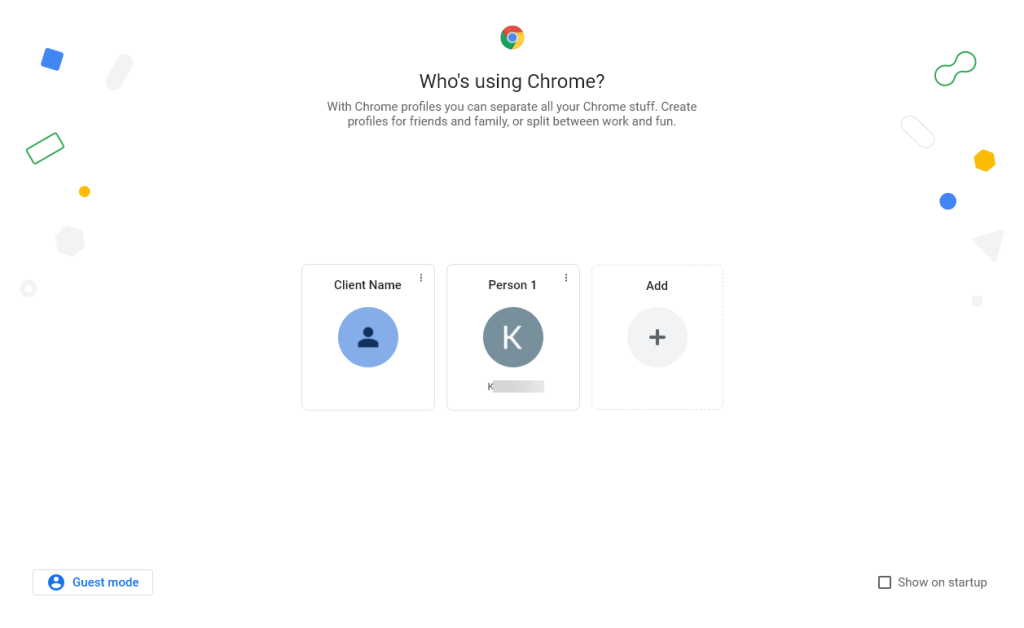
From these settings, you can add and delete profiles, select a profile to launch a new chrome window for, or select to show this window on startup.

If you select to show this window on startup, this window with the profile selector will be the first thing to open when you open chrome, allowing you to select which profile you want to use for that session

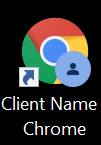
If you selected to create a shortcut, it will appear on your desktop with the profile name first. You can use this shorcut to quickly launch a chrome window into that profile.

You can also drag this to your taskbar to pin it for ease of access

Setting up profiles in Microsoft Edge

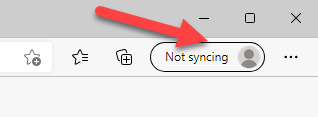
On the top right of Microsoft Edge, you will see a User icon. Click here to open a dropdown menu.

*icon and words will vary depending on how your profile is currently setup.

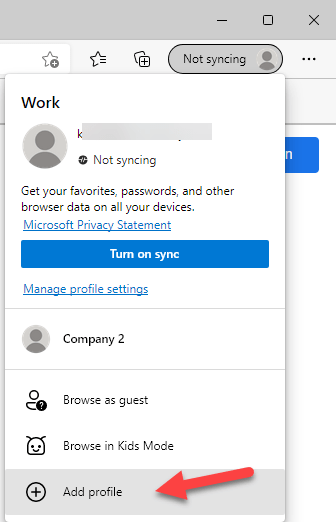
Click on “Add Profile” at the bottom of the dropdown menu.

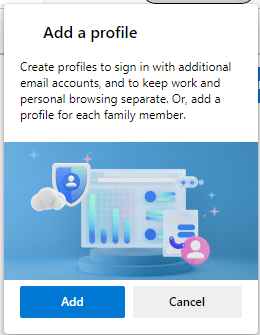
Click “Add” on the prompt

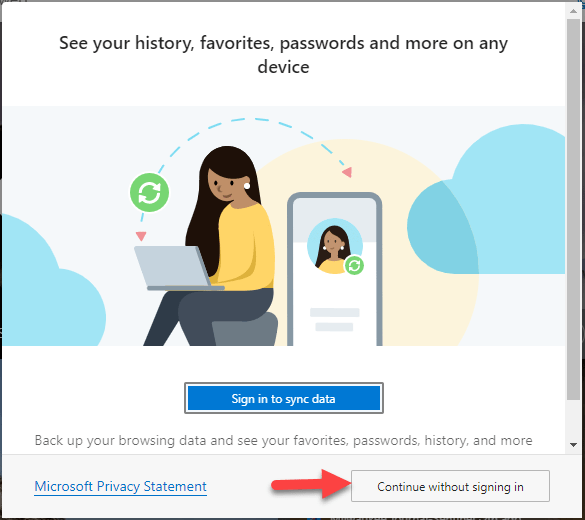
This will open a new edge browser in the new profile with an auto-generated description. Click on “Continue without signing in”

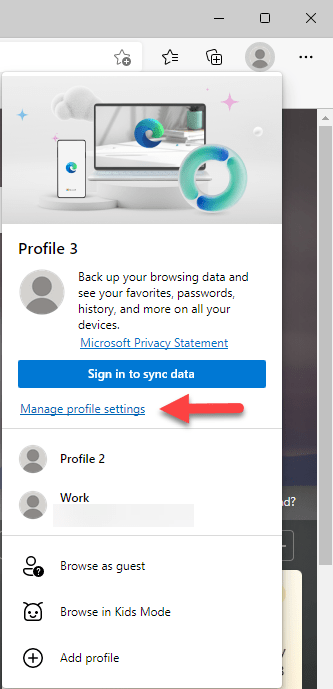
Click on the profile again to open the dropdown menu, and click the link for “Manage profile settings”.

Click on the elipsis (the three dots) and then select “edit” to edit the profile

You could also select delete if you no longer need the profile

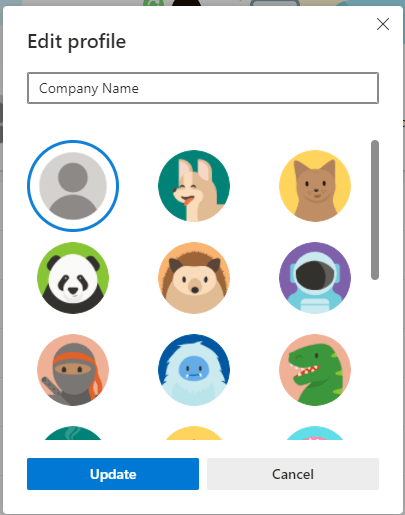
In the prompt, give the profile a name for easy identification. you can also give it an image to display as the icon.

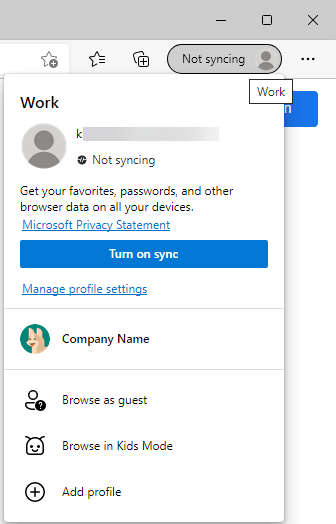
Now when clicking on the profile menu, the name and icon you selected are displayed.

Additionally, with the profile open, you will have your primary profile which has no icon, and the one with the icon for the new profile in your taskbar.

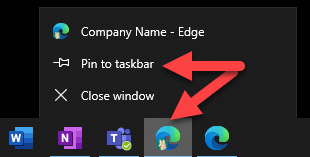
If you right click this icon, you can select to “pin to taskbar” so even when it closes it remains there for ease of access.

Now go forth and login to multiple accounts with convenience!

Flexing your Powershell: Bulk AccessTier modification for Azure Blobs

Credit where credit is due, first of all. This post would not be possible without HEAVILY (and by heavily I mean stealing everything but a single parameter modification) referencing https://webmakers.co.nz/how-to-convert-entire-data-in-a-blob-storage-from-cool-storage-tier-into-archive-access-tier/, so please go check that out so he gets the credit. 

Feel free to now skip to “The Command” if you don’t want the explanation of how I got here and why it works.

Backstory

We setup Azure storage and put a metric ton of data into it, organized into folders. Unfortunately, our cost projections were way off and we were bleeding money to Microsoft for the storage. This is a byproduct of our first foray into storing data natively in Microsoft Blobs on this scale. We were able to change the storage type to minimize this cost a lot, but knew that modifying the AccessTier on a subset of the data that is not regularly accessed would bring us back to the ballpark we expected.

We have two containers, lets call them data1 and data2, each with subfolders within subfolders within subfolders. We did not have this organized so that one container could be “cool” storage and one “hot”. All Containers were set to “Hot”, and we needed a single root “folder” (I’ll explain the quotes in a minute under The Breakthrough) within a container changed to cool, while the others remained hot.

Issue

You can modify the AccessTier on an entire container, or a single “file”, but not on a folder of files. Or so it seemed like from everything we were seeing (and the command provided in https://webmakers.co.nz/how-to-convert-entire-data-in-a-blob-storage-from-cool-storage-tier-into-archive-access-tier/ (seriously, click on that and give my source a reference). Additionally the folders turned out to not be anything usable to filter the selection.

The Breakthrough

In troubleshooting another issue I was having in getting powershell to load the right modules and run them correctly, I stumbled on a comment in a post about the “folders” in containers and blobs. It tickled something in my brain, but didn’t click all the way into place yet. I wish I still had that page open, but seeing as I read through 30 or more posts about this, I doubt I’ll ever find it again to reference it. My deepest apologies, and I promise I will edit this if I find it.

What it explained is that the folders are not folders in the traditional Microsoft Windows sense. Blob storage is a flat file system. The folders are just the filenames, and Azure parses them into displaying them into folders. So in collection “data” there is rootfolder\subfolder\file.txt, that is an actual file name. If windows handled files this way, and you wanted to use a command prompt to “cd” (change directory) into the users directory, it wouldn’t work.

I hope that makes sense.

The command

All that explanation aside, below is the command modified to pull only files from RootFolder1 and change them to the “cool” tier. If you had RootFolder2 and RootFolder3, they would remain the Access Tier they currently are. Items in bold need to be from your account.

Install-Module -Name AzureRM
Set-ExecutionPolicy -ExecutionPolicy RemoteSigned
Import-Module AzureRM
$StgAcc = “YourStorageAccountName”
$StgKey = “YourConnectionKey”
$Container = “YourContainerName”
$ctx = New-AzureStorageContext -StorageAccountName $StgAcc -StorageAccountKey $StgKey
Connect-AzureRmAccount
$blob = Get-AzureStorageBlob -Container $Container -Context $ctx -blob RootFolder1*
$blob.icloudblob.setstandardblobtier("Cool")

*after “Connect-AzureRmAccount” you will be prompted for a username and password to connect to Azure.

Recommendation:

After line 9, you can enter $blob to see what is stored in that variable. I did this to ensure it only pulled the files I wanted to change. It also shows the AccessTier. I ran it again after line 10 to verify the AccessTier changed.

Second Example:

If you want to make changes on a subfolder of a root folder, or a folder four levels deep, the modification is just to the -blob parameter. Say in “YourContainerName” there is folder strucure “RootFolder1\subfolder1\sub subfolder\” you would modify the -blob parameter as follows (note that the folder structure has a space, so requires the quotes:

Install-Module -Name AzureRM
Set-ExecutionPolicy -ExecutionPolicy RemoteSigned
Import-Module AzureRM
$StgAcc = “YourStorageAccountName”
$StgKey = “YourConnectionKey”
$Container = “YourContainerName”
$ctx = New-AzureStorageContext -StorageAccountName $StgAcc -StorageAccountKey $StgKey
Connect-AzureRmAccount
$blob = Get-AzureStorageBlob -Container $Container -Context $ctx -blob "RootFolder1/subfolder1/sub subfolder/*"
$blob.icloudblob.setstandardblobtier("Cool")

Additional helpful notes, maybe

YourStorageAccountName  – open the Azure portal and go to “storage accounts”. the “Name” of the accounts your containers are in is what is used here.
YourConnectionKey  – once you have your storage account open, go to “Access Keys” under settings, this is the super long and complicated string under “Key”
YourContainerName – same page you are already on, scroll down to “container” under Blob Service. This will be the “Name” that contains the data that you want to work with.

The Saga is Complete

And with that I will go home, plug in my computer and let powershell change the AccessTier of a couple thousand files while I get some food and melt my brain with junk TV shows.

Duplicating an AWS server – should have just started from scratch…

I’ve spent the better part of a week working on this, and we have finally found all the little issues, so far…

Here’s the problem, we had a citrix server in AWS running some services for monitoring for our company, which was overloading the server causing usability issues both with citrix and the services. Rather than building a new server from scratch and reconfiguring either citrix or the services, we figured that we would just spin up a new instance from a nightly backup of the original server and remove components from each, which would be quicker than starting from scratch, theoretically that is. After way too much time spent on finding each glitch, here is the end result.

1. Spin up a new instance that will be your duplicate. NOTE: if you are in a domain, to avoid conflicts, put this server in its own security group so it cannot see the domain and cannot conflict with your live server.

2. Let it boot all the way up and connect to it. Once logged in use the EC2config service to rename the system on boot and set the admin password you desire. For more info on this service, see this link. Once those parameters are set, shut the instance down.

3. Take the latest snapshot in the AWS console for the instance you are copying, right click it and create a volume from it.

4. Detach the instance’s volume that it spun up with and attach the volume created from the snapshot on /dev/sda1 to make it the boot drive.

5. let the instance completely boot up. At this point, it will have the same network interface and IP as the original server, which can’t be changed in a VPC.

6. Shut the instance down and attach a new network interface with the desired IP address. Remove the old interface. NOTE: I did not do this portion personally, so I’m not sure if you need to boot it then shut down again to remove the old interface, but I would assume you can’t do it live.

You will now have a duplicate instance. It seems easy now that we have the steps, but getting here was such a pain I would have rather started from scratch.

WebDav for external access to Synology Shares via Windows

While setting up a Synology as a file server for a client, I wanted to have them be able to access their share through a mapped drive in windows, whether in the network or outside. Ran into some stumbling blocks and couldn’t find full answers so I’m posting my own (referencing already awesome documentation where available).

1. The client does not have a static IP and the Syno is the only internal device that needs to be accessed internally, so I did not feel the purchase of a static IP to be necessary. Synology allows you to sign up for a free DDNS address through them. I registered clientname.synology.me through the DDNS feature of the Synology control panel. See Synology’s Documentation here. Once that was up and running, I created a CNAME DNS record for files.clientdomain.com to resolve to clientname.synology.me.

2. I enabled WebDav on the Synology, as described here. NOTE: The users also need to have WebDav permissions to the share they are connecting to.

3. I created firewall rules for external traffic hitting ports 5001 and 5006 to redirect to the Internal Synology IP address.

4. I purchased a SSL certificate from godaddy for files.clientdomain.com, using this article as a guide to install it. Note about this article: I was not able to use some of the directories referenced, specifically /volume1/generic/certificate, so I used a shared folder that was already there. EDIT 03/09/15: Synology has made installing an SSL so much simpler! See this link. If the intermediate certificate errors, you can get the correct one from your provider, in the case of godady it is here.

NOTE: At this point, you can use DSFILE app for iPhone and Android without any further configuration.

5. Most of the documentation will tell you you need a third party application to use webdav to map a drive in Windows. See this for example. EXCEPT if you have an SSL cert. But almost none of the documentation tells you what to do if you have an SSL cert. After some trial and error I found you have to enter https://files.clientdomain.com:5006/sharename, in the map network drive folder box.

EXTRA CREDIT: if you want the same drive to work internally and externally: local DNS must be setup with a forward lookup zone for the domain, with files.clientdomain.com pointing to the internal address of the synology. If this isn’t an option, you can have one drive mapped to the internal address, and one mapped to the external.


Synology now has me totally sold! This is the fifth one I have installed at client locations and I’m ready to order the DS414 starting with two 4TB drives for my home!


Office365 – When Distribution Groups Go Bad

We have migrated a number of clients to Office365, including my own company’s email system. Every once in a while, we run into a glitch in the Matrix and have to chase down what Microsoft suddenly changed and how we can get around it. In today’s episode of “What Did Microsoft Fuck Up?”, we encounter distribution list problems.

These distribution groups have been working for the entire time that the accounts have been active, so in some cases, this has been over a year. The problem is that emails to distribution groups that include external contacts were delivering to the internal contacts and silently failing to the external. Logs available to the customer admin account did not indicate any failure. Opened a Service Request with Microsoft, but they are next to useless, and almost always call when I am not available. Researched on my own and found http://community.office365.com/en-us/forums/158/t/145925.aspx. Found that once we enabled the -ReportToOriginatorEnabled on the distribution groups, sending worked flawlessly.

Since I already had the ticket opened with Microsoft, I wanted to see if they could provide a root cause, and to educate them on their own system since other users are experiencing the same issue. Microsoft’s response was that it was due to the “service upgrade”, which all of the accounts in question had gone through months ago, and the problem only started a few days ago. I pushed them further and finally the tech I was working with was going to get a Senior FOPE (Forefront Online Protection for Exchange) to speak with me. Even she couldn’t get him on the phone. She essentially waved it off as a silent FOPE update that required the mx record for the domain to be changed to a new address that reflects domain-com.mail.protection.outlook.com, rather then the old address that did not use “protection”.

The problem in our case is then: these particular clients use McAfee SaaS spam filtering, thus their mx records need to be set to point to McAfee, and McAfee forwards the mail to Office365. Thus the root cause is apparent.

TL;DR:

Problem: distribution groups with external contacts deliver successfully internally, fail silently to external addresses.

Root Cause:

1. On the distribution groups -ReportToOriginatorEnabled is by default false. Historically, this has not been a problem.
2. There was a silent update to Forefront Online Protection for Exchange. This update recommends that the MX record for the domain point to the new office365 MX record that includes “protection” in the address.
3. The clients that experienced this issue use McAfee spam filtering which requires the MX records to point to McAfee rather than directly to office365.

Solution:

Set -ReportToOriginatorEnabled to True on all distribution groups for any company that cannot have the new MX record. This can be done for all distribution groups at once by using powershell command:

> Get-DistributionGroup | Set-DistributionGroup -ReportToOriginatorEnabled $true

Bear in mind that any further distribution group will need this flag changed as well. This can be accomplished using this powershell command:

Set-DistributionGroup “display name of distribution group” -ReportToOriginatorEnabled $true

The blind migrating the blind (or how I migrated from vmware to hyper-v)

Had a client that decided not to take our recommendation of moving from an older version of vmware to the latest and greatest vmware on new hardware. Instead, they purchased whatever hardware and software they wanted from another vendor, and asked us to configure and migrate their entire domain (14+ servers) from the existing vmware environment to Hyper-V. Following will be my notes of what worked, maybe with a dash of what didn’t (even though I have tried to erase those moments from my memory). I will also include other pages that I referenced throughout….or a listing of them…I’m not sure yet… So to start, The Client (heretofore referred to as “The Client”), purchased the following

  • 2 HP DL380 Servers, each with 4 onboard NICs and 4 NICs on an expansion card, with dual power supplies
  • 2 Cisco SMB switches (I didn’t do much with the configuration of these, so that’s probably not the correct terminology)
  • 1 ESX iSCSI SAN, with 1 DAE. this included approximately 4.5 TB in the main enclosure on SATA drives, and another couple TB on SAS drives in the DAE.
  • Hyper-V and Windows Server 2012

Theoretically, the initial game plan was to:

  1. Store everything in a datastore on the SAN that was in a RAID5 configuration
  2. Break the server NICs into teams of two for failover and breaking out the SAN connection from the regular network connection
  3. Use System Center 2012 Virtual Machine Manager (SCVMM) to configure and migrate all of the machines

Seems simple right? Exactly. The posts following this one will go into detail on the following steps

  • Configuring datastores for Hyper-V storage, with a special note that two servers CANNOT connect to the same datastore
  • Setting up NIC teaming in **Hyper-V Manager**
  • Setting up the virtual switches in SCVMM
  • Testing the V2V process before the actual migration, including details on special considerations moving from Vmware to Hyper-V
  • Ensuring that your test environment is the same as the live migration environment (special appearance by Domain vs. Workgroup and Knowing your Network)

Seeing as I have been planning on writing this up since the migration which was 3+ Months ago, only time will tell when the follow up detailed posts will appear.